
AI applications can become expensive long before teams realize where the money is going. Every model request can carry input tokens, output tokens, latency requirements and provider fees. As traffic grows, small inefficiencies can quickly become a meaningful operating cost.
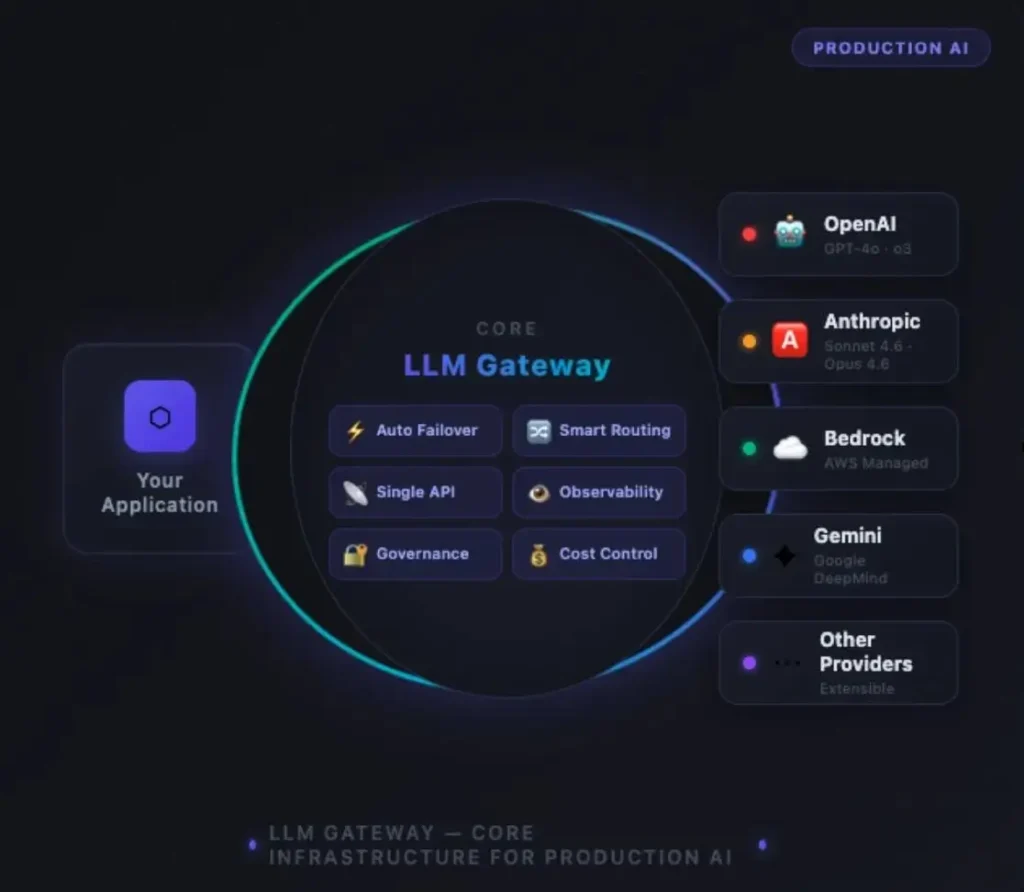
An AI inference gateway gives teams a control layer between their applications and model providers. Instead of sending every request to one model or one API endpoint, the gateway can help route traffic, manage fallbacks, apply limits, monitor usage and reduce unnecessary model calls.
This guide compares five strong AI inference gateways for 2026 and explains where each one fits. The goal is not simply to find the gateway with the longest feature list. It is to identify the option that best matches your workload, engineering model, cost priorities and production requirements.
Quick Answer
For teams that want a flexible open-source gateway, LiteLLM is a strong starting point. Portkey is well suited to teams that want managed routing and governance features. Helicone stands out for managed provider routing and observability. TensorZero is attractive for teams building an optimization-focused LLM stack. Cloudflare AI Gateway is compelling when caching, edge infrastructure, analytics and centralized controls are important.
What Is an AI Inference Gateway?
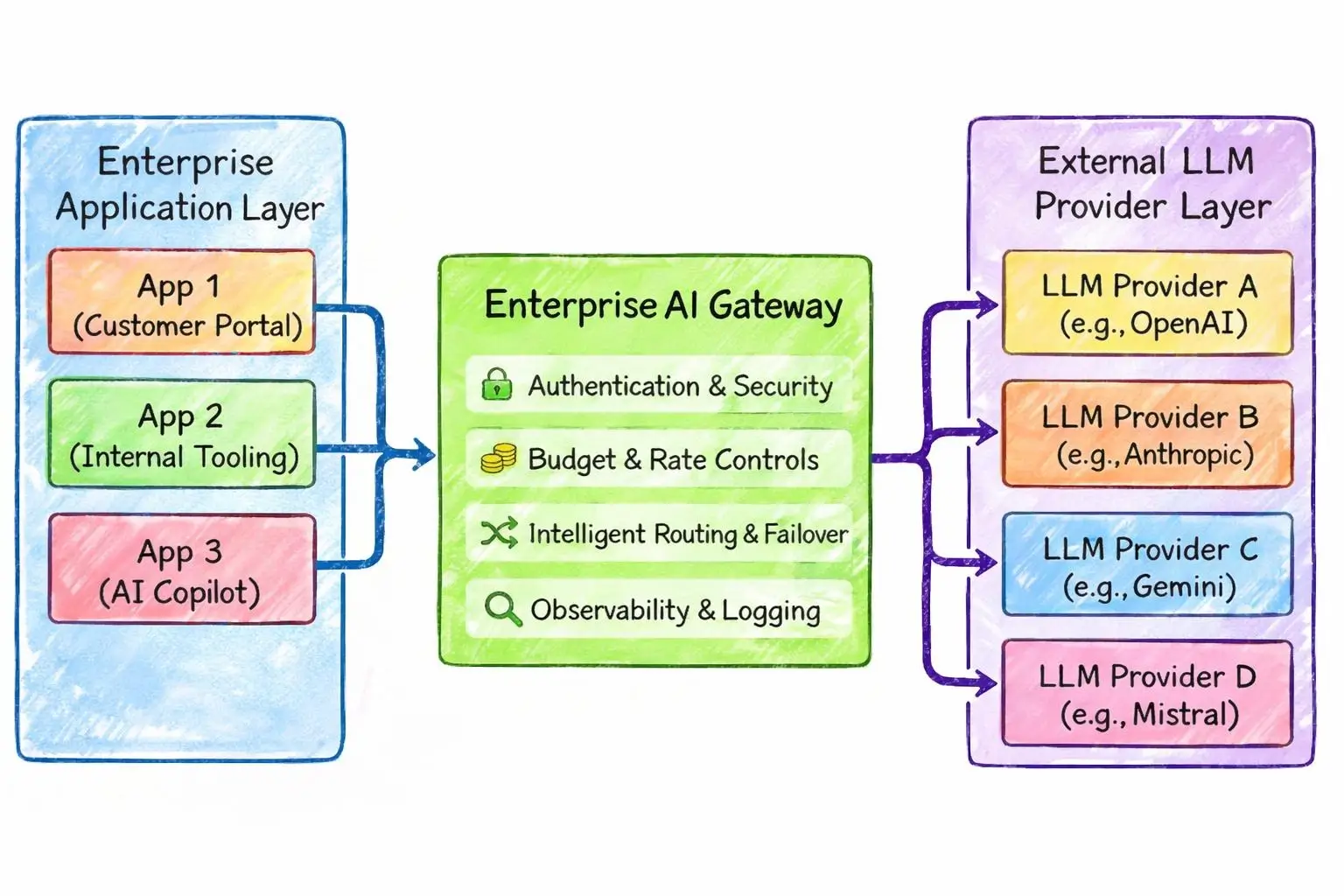
An AI inference gateway sits between an application and one or more AI model providers. It gives engineering teams a consistent way to control how model requests are handled.
Instead of hard coding every provider directly into an application, a gateway can provide one control layer for tasks such as model routing, provider failover, caching, rate limiting, authentication and usage tracking.
This becomes especially useful when an application uses several models. A simple request might go to a lower cost model while a complex request is sent to a more capable model. If a provider reaches a rate limit or becomes unavailable, the gateway can route the request elsewhere when the configured strategy supports it.
That control becomes more important as an AI application moves from experimentation into production. Teams need to understand not only whether a model works but also what each request costs, how quickly it responds and what happens when the preferred provider fails.
For a broader look at the infrastructure layer around AI workloads, see our guide to AI inference infrastructure.
Why AI Inference Gateways Matter for LLM Cost Optimization
The biggest mistake is to assume that an inference gateway automatically makes every AI request cheaper. It does not.
The savings come from how the gateway is configured and how intelligently the application uses it.
- Model routing: Send simple workloads to lower cost models and reserve expensive models for tasks that need them.
- Provider routing: Use more than one provider when pricing or availability differs.
- Caching: Avoid paying for repeated identical requests when cached responses are appropriate.
- Fallbacks: Reduce application downtime when a preferred provider has an outage or rate-limit problem.
- Usage controls: Monitor tokens and spending before costs become difficult to manage.
- Centralized governance: Apply consistent policies without changing every application separately.
Cost insight:
The cheapest model is not always the cheapest production choice. A lower API price can lose its advantage if it creates more retries, poorer outputs or additional application calls.
Teams working on broader AI cost control can also explore our AI FinOps guide which looks at financial management for AI workloads beyond a single gateway.
5 Best AI Inference Gateways in 2026
1. LiteLLM
Best for: teams that want flexibility and control.
LiteLLM is a popular choice for developers who want a common interface across many model providers. Its documentation describes support for 100+ LLMs through a consistent input and output format. Its Proxy Server also provides features such as spend tracking, budgets, authentication, logging and rate limiting.
That makes LiteLLM particularly useful when a platform team wants to centralize model access instead of allowing every application to manage provider integrations separately.
Its routing capabilities also make it practical for workloads that need retries or fallbacks across deployments. Teams can therefore build a more flexible provider strategy without rewriting the application for every model service.
Why choose LiteLLM?
Choose it when engineering flexibility, provider choice and self hosting matter more than having a fully managed control plane.
2. Portkey
Best for: production teams that need routing and operational controls.
Portkey provides an AI gateway with a broad set of routing and reliability features. Its current documentation lists conditional routing, fallbacks, load balancing, retries, caching, circuit breakers, budget limits and rate limits.
Its conditional routing can direct requests according to metadata or request parameters. That opens up useful production patterns such as sending premium users to a stronger model while routing lower-priority workloads toward a cheaper option.
Portkey also supports fallback chains between models and providers. This can improve resilience when a primary provider returns errors or becomes unavailable. The important point is that fallback design should consider both compatibility and cost because one request can potentially invoke more than one model.
See the official Portkey AI Gateway documentation for its current routing and gateway capabilities.
3. Helicone
Best for: teams that want managed provider routing with observability.
Helicone’s AI Gateway provides a unified API across a large provider ecosystem. Its current documentation describes intelligent provider routing, automatic failover and cost aware provider selection.
One useful advantage is that teams can work with the same model across different providers. If one provider is unavailable or reaches a rate limit, the gateway can attempt another available provider according to the configured routing approach.
This can reduce the operational burden of managing multiple provider integrations directly inside application code.
Helicone also puts strong emphasis on observability. Teams can use gateway level information to understand requests, costs and performance across providers rather than looking at each provider separately.
Best fit:
Helicone makes the most sense when you want managed infrastructure and want provider routing and observability to live together.
4. TensorZero
Best for: teams building an optimization focused LLM stack.
TensorZero takes a broader approach than simply acting as an API proxy. Its gateway provides a unified interface across major LLM providers while its wider stack adds observability, evaluation, experimentation and optimization workflows.
Its gateway supports provider routing and fallbacks. It also supports inference caching that can serve identical requests without sending them back to the model provider. That can reduce repeated inference costs while also improving response time for suitable workloads.
The platform is particularly interesting for teams that want operational data to feed into continuous model and prompt optimization rather than treating gateway infrastructure as a separate layer.
For teams already working on model lifecycle controls, our AI model monitoring guide provides useful context on the monitoring side of production AI systems.
5. Cloudflare AI Gateway
Best for: teams that want AI controls alongside Cloudflare infrastructure.
Cloudflare AI Gateway provides a managed layer for observing and controlling AI applications. Current documentation lists analytics, logging, caching, rate limiting, retries and model fallback among its capabilities.
Caching is especially relevant to cost optimization. When an identical request can safely be served from cache, the application can avoid another round trip to the model provider. Cloudflare documents caching as a way to reduce latency and provider usage for suitable repeated requests.
The gateway also provides visibility into requests, tokens, costs, errors and cached responses. That makes it easier for teams to identify where AI spending is actually going.
Another advantage is the surrounding Cloudflare ecosystem. Teams already using Cloudflare may find it easier to place AI traffic controls within an infrastructure stack they already understand.
See the official Cloudflare AI Gateway documentation for the current feature set and deployment options.
How to Choose the Right AI Inference Gateway
The right choice depends on what you are trying to control.
How to Reduce LLM API Costs With a Gateway
A gateway becomes valuable when it is connected to a clear cost strategy. Start with measurement before changing routing rules.
1. Measure Your Current Usage
Track requests, input tokens, output tokens, model selection, latency, errors and actual provider costs. Without a baseline, it is difficult to know whether a routing change is improving the system.
2. Create Model Tiers
Not every request needs the most capable model. Separate workloads into practical tiers such as low complexity, standard and high complexity. Route each tier according to quality requirements and budget.
3. Add Caching Where It Makes Sense
Repeated requests can create unnecessary provider spend. Caching can help when the same request can safely return the same response. Avoid caching dynamic or sensitive workloads without carefully considering freshness and privacy.
4. Use Fallbacks Carefully
Fallbacks improve resilience but they are not free. A failed request followed by another model request can increase total usage. Monitor fallback frequency and investigate recurring failures rather than treating fallback as the complete solution.
5. Review the Routing Rules Regularly
Model pricing and capabilities change quickly. A routing policy that was efficient six months ago may not remain optimal. Review cost, quality and latency together rather than optimizing one metric in isolation.
AI Inference Gateway vs Direct Model APIs
A direct model API is often the simplest option for a small application. You choose a provider add the API key and send requests.
The gateway approach becomes more valuable as the system grows. Instead of every application managing its own provider connections, a central gateway can provide common routing and operational controls.
What About Latency?
Adding a gateway introduces another network and processing layer. That does not mean the overall application will necessarily become slower.
A well-designed gateway can offset some overhead through caching, better provider selection and faster recovery from failed requests. The real question is total application latency rather than gateway overhead alone.
Measure time to first token, total response time, provider response time and gateway processing time. This gives your team a clearer picture of where latency is actually coming from.
Security and Governance Considerations
Centralizing AI traffic can improve governance because teams have one place to apply policies. However the gateway should not become a blind storage point for sensitive prompts and responses.
Review authentication, access controls, logging, data retention and provider routing before sending sensitive business information through a gateway.
Teams working with enterprise AI should also consider the wider governance layer. Our guide to enterprise AI governance frameworks covers the broader controls needed around production AI systems.
Security reminder:
Do not assume that a gateway automatically makes an AI application secure. Review provider access, secrets, logs, retention and sensitive data handling as part of the full architecture.
Our Verdict
There is no single AI inference gateway that is best for every organization.LiteLLM is a strong option when flexibility and self-hosting are important. Portkey is attractive for teams that want mature routing and operational controls. Helicone is a useful choice for managed provider routing with observability. TensorZero stands out for teams that want gateway infrastructure connected to evaluation and optimization. Cloudflare AI Gateway is especially interesting for teams that want AI traffic controls alongside Cloudflare’s broader infrastructure.
The better question is not which gateway has the most features. It is which gateway gives your team the right balance of cost control, reliability, latency, governance and engineering effort.
Start with your actual traffic patterns. Measure where money and latency are going. Then introduce routing, caching and fallback policies where they solve a demonstrated problem.
Final Takeaway
LLM costs become harder to control as AI applications scale. An AI inference gateway can give engineering teams a practical control point for routing, caching, reliability and usage visibility.
The strongest strategy is to treat the gateway as part of the overall AI architecture rather than as a magic cost cutting tool. Measure first. Route intelligently. Cache suitable workloads. Monitor failures. Review provider economics regularly.
That approach can help businesses build AI systems that are not only cheaper to operate but also easier to manage as usage grows.
Frequently Asked Questions
What is an AI inference gateway?
An AI inference gateway is a control layer between an application and AI model providers. It can centralize model access and provide features such as routing, fallbacks, caching, rate limits, authentication and usage monitoring.
Can an AI gateway reduce LLM API costs?
Yes. A gateway can help reduce costs through smarter model routing, caching, provider selection and usage controls. Actual savings depend on the workload and how the routing policies are configured.
Are AI inference gateways useful for enterprise AI?
They can be especially useful for enterprise environments where several applications use multiple models and providers. A centralized gateway can make routing, monitoring and policy management easier to control.
Should every AI application use a gateway?
No. A small application with one model provider may not need the extra infrastructure layer. A gateway becomes more useful when the application needs multiple providers, centralized controls, reliability strategies or detailed cost visibility.
Which AI inference gateway should I choose?
Choose based on your architecture rather than feature count. LiteLLM suits flexible engineering teams. Portkey fits managed routing and governance needs. Helicone emphasizes managed provider routing and observability. TensorZero suits optimization focused teams. Cloudflare AI Gateway fits teams that value Cloudflare based infrastructure and controls.